direct is the CTI software for macOS for IP phones, phone systems, or tiptel phones.
 direct makes telephoning with a Mac a pleasure:
Not only is placing a call with direct quick and easy, but if a caller has not
suppressed his number, direct can display the caller's identity before you answer
the call. With direct's AppleScript support you can place calls directly from
hundreds of Mac programs.
direct makes telephoning with a Mac a pleasure:
Not only is placing a call with direct quick and easy, but if a caller has not
suppressed his number, direct can display the caller's identity before you answer
the call. With direct's AppleScript support you can place calls directly from
hundreds of Mac programs.
direct supports standard IP phones from Fanvil, Gequdio, Mitel, Snom und Yealink, as well as a large number of phone systems from major vendors, for example Aastra, Alcatel, Ascotel, Auerswald, Avaya, Cisco, DeTeWe, Deutsche Telekom, Ericsson, NEC, Panasonic, Shoretel, Siemens, Tenovis, and others. In addition, older ISDN phones from Tiptel are supported as well.
The search engine for your phone book
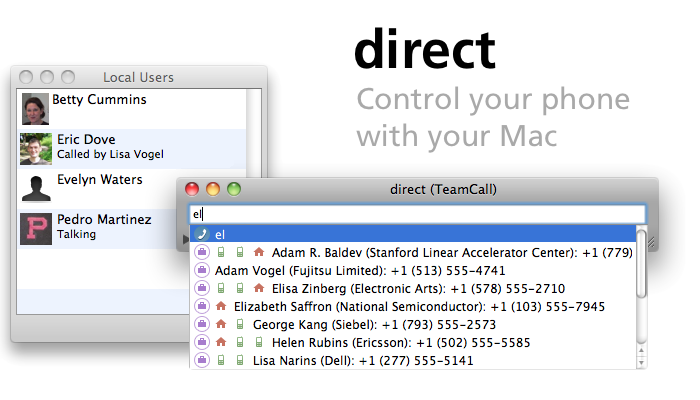
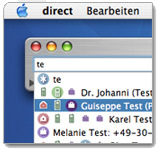 direct eliminates cumbersome dialing with the telephone. Just begin typing the
name of the person you wish to contact. Based upon the first letters, direct
automatically searches your personal address book and company LDAP directory for
relevant contacts. Use the arrow keys to choose the desired contact from the list
and type return.
direct eliminates cumbersome dialing with the telephone. Just begin typing the
name of the person you wish to contact. Based upon the first letters, direct
automatically searches your personal address book and company LDAP directory for
relevant contacts. Use the arrow keys to choose the desired contact from the list
and type return.
Popup upon incoming calls
 You finally know who's calling before you answer! direct displays the caller's
name on your screen before your accept the call. Another innovation from direct
is the ability to present a photo of the caller, if you have one associated with
the contact. Of course you can configure if and how long it is displayed.
You finally know who's calling before you answer! direct displays the caller's
name on your screen before your accept the call. Another innovation from direct
is the ability to present a photo of the caller, if you have one associated with
the contact. Of course you can configure if and how long it is displayed.
direct can use entries from both personal address books and network LDAP
directories. Prerequisite for this function is of course that the caller has
not suppressed his number.
Databases (macOS Contacts and LDAP)
 direct does not care where your contact information is stored (locally, network, iCloud). As long as it can be accessed from your macOS Contacts application or from a network LDAP directory.
Information is searched for and displayed transparently. You don't have to worry about where individual contact information is stored. So just telephone!
direct does not care where your contact information is stored (locally, network, iCloud). As long as it can be accessed from your macOS Contacts application or from a network LDAP directory.
Information is searched for and displayed transparently. You don't have to worry about where individual contact information is stored. So just telephone!
LDAP for networks: With LDAP, all users in a network can use a central directory
for email addresses and telephone numbers.
The macOS Contacts application is a good
supplement for managing private contacts that you wish to
synchronize with your iPhone, other mobile, iPad or iPod.
Bonjour
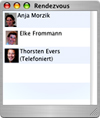 You would like to connect a call to a colleague, but aren't sure if they are
currently on the phone? direct's Bonjour window knows the answer. Here you can
find a list of all the colleagues using direct, including their current telephone
status. Eliminate the hit-or-miss involved in connecting a call.
You would like to connect a call to a colleague, but aren't sure if they are
currently on the phone? direct's Bonjour window knows the answer. Here you can
find a list of all the colleagues using direct, including their current telephone
status. Eliminate the hit-or-miss involved in connecting a call.
Dock menu integration
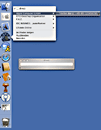 The direct dock menu puts important numbers at your fingertips. Display
contact's telephone numbers from an macOS Contacts group by right clicking the direct icon in the dock. These can then be dialed with a click.
The direct dock menu puts important numbers at your fingertips. Display
contact's telephone numbers from an macOS Contacts group by right clicking the direct icon in the dock. These can then be dialed with a click.
The dock menu function is the perfect solution for your most frequently used numbers. So enter your top 10 delivery services, five best friends, your colleagues, or, or, or...
|








 Third-party applications can also call with direct.
Using the integrated AppleScript interface this can be done without difficulty,
for example using a FileMaker application. This functions not only when dialing,
but also for incoming calls. Here you can write your own AppleScript to send the
number of an incoming caller to be searched for in a File Maker application.
The possibilities are almost boundless.
Third-party applications can also call with direct.
Using the integrated AppleScript interface this can be done without difficulty,
for example using a FileMaker application. This functions not only when dialing,
but also for incoming calls. Here you can write your own AppleScript to send the
number of an incoming caller to be searched for in a File Maker application.
The possibilities are almost boundless.