Other programs can also dial using direct. This is implemented through the integrated AppleScript interface.
 Integration using AppleScript It's easy to integrate dialing functionality in third-party
software using AppleScript, for example in a FileMaker application. This works not only when calling
out, but also for incoming calls. You can write your own AppleScripts to search for the number of an
incoming caller in a File Maker application. The possibilities are almost boundless.
Integration using AppleScript It's easy to integrate dialing functionality in third-party
software using AppleScript, for example in a FileMaker application. This works not only when calling
out, but also for incoming calls. You can write your own AppleScripts to search for the number of an
incoming caller in a File Maker application. The possibilities are almost boundless.
FileMaker
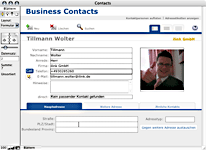 In addition to being able to add a dial button to a FileMaker database, it is naturally also possible to configure FileMaker to search for a data record based upon the number of the calling party.
An example database for FileMaker 12 can be found in the direct extras (which you can access via the direct help menu).
In addition to being able to add a dial button to a FileMaker database, it is naturally also possible to configure FileMaker to search for a data record based upon the number of the calling party.
An example database for FileMaker 12 can be found in the direct extras (which you can access via the direct help menu).
If you are an application developer who would like to learn more about macOS telephone integration, please contact us. We would be happy to advise you.
Outlook
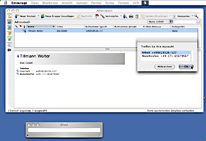 Microsoft Outlook is a popular program for administering contact data, appointments and emails. And with your contact data already there, nothing is more natural than using it to dial as well.
In the direct extras (which you can access via the direct help menu) you'll find an AppleScript that presents all numbers of a contact in a pop-up window for dialing.
Your own scripts?
 Have you written an AppleScript for your favorite program? Want to share it with other direct users? Just send us your AppleScript so we can place it in our downloads area for other direct users.
|
Does this sound familiar? You have received a telephone number in an email you would
like to dial. For this you have to enter the number by hand, including annoying errors.
With direct you can accomplish this better, faster and more comfortably. You select a telephone number with the mouse and choose "dial selected number"
from the service menu.
This is even faster with a keyboard shortcut. This works in every program that supports the Service menu, for example a browser.
|
|








)
)


